Washing machine and tumble dryer WiFi help
Issue
- How to turn on the WiFi connection?
- How to check the WiFi signal strength?
- How to turn on the Remote Start mode?
Applies to
- connected washing machine
- connected tumble dryer
Resolution
First-time connection
Check whether the home router is working correctly by:
1. Check WiFi connection to your smartphone – must be ON.
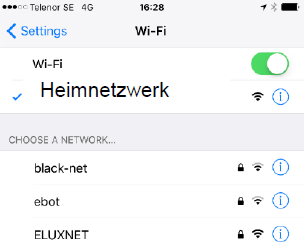
2. If there are other devices connected to the home router, do the other devices work?
- If other devices do not work, restart the home router
- If other devices work, restart your washing machine or tumble dryer.
Appliance already connected
1. Check the following:
- Is the WiFi signal indicator visible in the upper left corner of the appliance's display?
- How strong the signal is (3/5, 4/5, 5/5)?
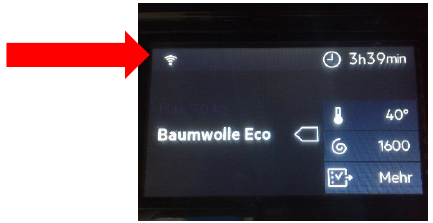
2. Turning on the WiFi connection.

3. Checking the WiFi signal strength (optimal signal strength from 3/5).

4. Turning on the Remote Start mode.
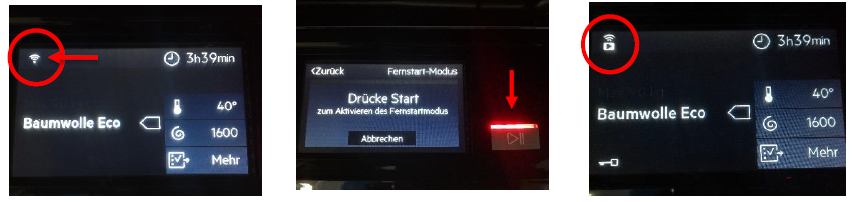
Tips:
- Always update the app to the latest version for best performance
Was this article helpful?
Related Articles
- The door of the washing machine cannot be opened
- How to clean and maintain your AEG washing machine and extend its life
- How to remove transit bolts from your AEG washing machine
- The washing machine drum resists when you try to turn it by hand
- Which detergent is best to use in my washing machine?
- Washing machine stops in the middle of a cycle
- Washing Machine Not Draining Water – Error Code E20 or E21
- Connected Appliance Cannot Connect to Wi‑Fi or App
- Clothing Wash Care Symbols
- Washing Machine Error Code E40, E41 (4 Beeps / 4 Flashes): Causes & Fixes
Related Articles
- The door of the washing machine cannot be opened
- How to clean and maintain your AEG washing machine and extend its life
- How to remove transit bolts from your AEG washing machine
- The washing machine drum resists when you try to turn it by hand
- Which detergent is best to use in my washing machine?
- Washing machine stops in the middle of a cycle
- Washing Machine Not Draining Water – Error Code E20 or E21
- Connected Appliance Cannot Connect to Wi‑Fi or App
- Clothing Wash Care Symbols
- Washing Machine Error Code E40, E41 (4 Beeps / 4 Flashes): Causes & Fixes