Tumble Dryer - How to replace the humidity sensor
Resolution

Refer always to your product’s user manual safety information before any repair or maintenance operation. https://www.electrolux.com/support/user-manuals/

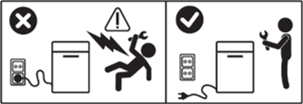
WARNING! RISK OF ELECTRIC SHOCK
Before any repair or maintenance operation, deactivate the appliance and disconnect the mains plug from the socket.
WARNING! RISK OF INJURY

Always take care when moving appliances. For heavy appliances it's safest for two persons to move it. Always use safety gloves and safety footwear. Wear safety gloves at all times to protect from cuts from sharp edges.
WARNING! RISK OF EYE INJURY

Wear safety glasses if you perform maintenance or repair work involving springs.
WARNING! RISK OF PINCHING

Wear safety gloves if you perform maintenance or repair work involving belts.
WARNING! NOT INTENDED FOR CHILDREN

Keep all small parts and packaging out of reach of children under 3 years due to choking hazard. Installation and use should be performed by adults only.
-
Always empty the appliance of all the water, e.g. tumble dryer water container. Any maintenance should be carried out with the appliance standing upright. Residual water could damage electronics if the appliance is placed on any of its sides.
Make sure to use the product only for its designated purpose and verify that it is a compatible part for the intended product.
Do not use or install the product if damaged.
Please note that self-repair or nonprofessional repair can have safety consequences if not done properly and might void the warranty. Possessing the necessary know-how is essential.
How to replace the humidity sensor
1. Open door to access the humidity sensor on the inside of the drum. Unscrew the three PH2 screws on the humidity sensor cover.
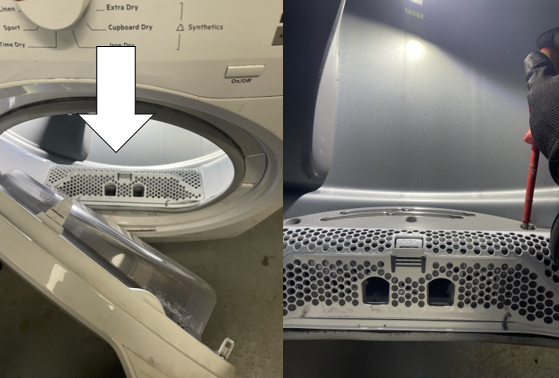
2. Lift from the bottom of the housing and slide to the left to remove the sensor housing. Note: When reassembling ensure the tab on the right-hand side is put back into its housing first.
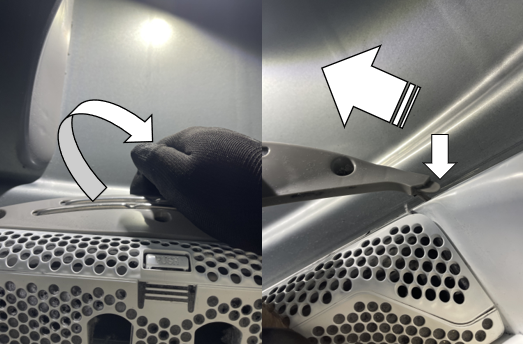
3. Carefully disconnect wiring connector from the heating element. Be careful not to damage the connector.
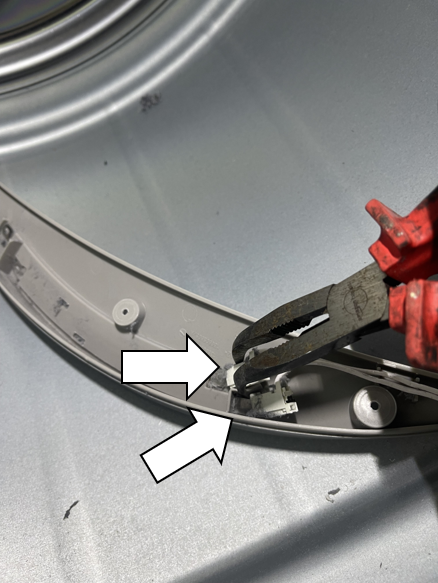
4. Use a small flat bladed screwdriver to unclip the humidity sensor and then slide the humidity sensor out of the housing.
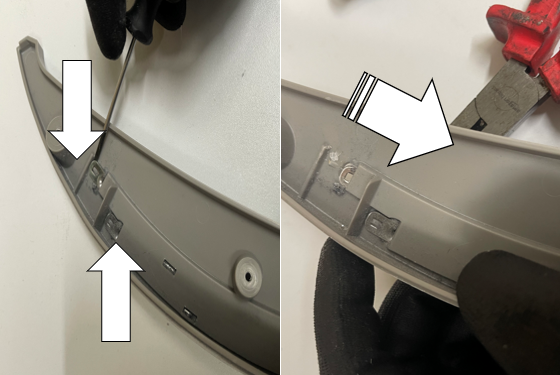
5. On the opposite side of the housing continue to slide out the humidity sensor from it’s holder.
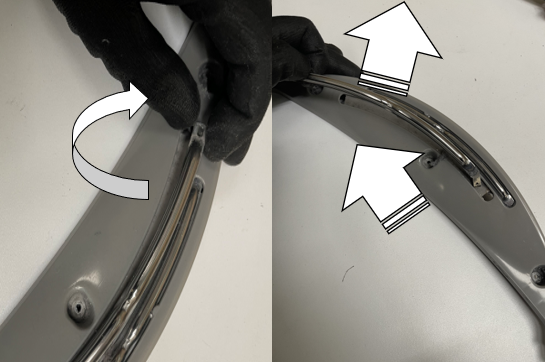
6. When assembling repeat steps in reverse order.
Was this article helpful?
Related Articles
- Tumble Dryer - How to replace the motor fixing bracket
- Tumble dryer - How to replace drive belt (6)
- Tumble Dryer - How to replace drain pump
- Tumble Dryer - How to Replace Motor Bushing Kit
- Tumble Dryer - How to replace heating element (4)
- Tumble Dryer - How to replace the tension spring
- Tumble Dryer - How to replace the clamping roller
- Tumble Dryer - How to replace the bush roller
- Tumble Dryer - How to replace the door switch
- Tumble dryer - How to replace drive belt (4)
Spare parts & Accessories
Find original spare parts and accessories for your appliance in our webshop and have them delivered directly to your door.
Related Articles
- Tumble Dryer - How to replace the motor fixing bracket
- Tumble dryer - How to replace drive belt (6)
- Tumble Dryer - How to replace drain pump
- Tumble Dryer - How to Replace Motor Bushing Kit
- Tumble Dryer - How to replace heating element (4)
- Tumble Dryer - How to replace the tension spring
- Tumble Dryer - How to replace the clamping roller
- Tumble Dryer - How to replace the bush roller
- Tumble Dryer - How to replace the door switch
- Tumble dryer - How to replace drive belt (4)