Hob Not Working: Cannot Activate, No Display, or Interface Not Responding
Issue
- The hob cannot be activated or is not operating
- The hob does not work
- The hob display does not show any symbols
- The hob is turning on, but the user interface is unresponsive / does not react
- The user interface is unresponsive or does not react to touch/input.
Applies to
- Induction Hobs
- Ceramic Hobs
- Cookers
Resolution
If the hob does not work/does not display any symbols right after being connected, this indicates possible incorrect installation.
Since electrical connections can be hazardous, it's strongly recommended to contact a certified installer or electrician to inspect and verify the setup. This ensures safety and compliance with local regulations.
If the hob stopped working after some time after installation, please check the causes below to rectify the problem:
1. Disconnect the appliance from the power supply for at least 30 seconds.
Note: To reset the appliance, unplug it and wait 30 seconds before plugging it in again. In the case of built-in appliances, where it is not possible to disconnect the appliance from the socket, you need to disconnect it from the mains via the main switchboard (RCD switch).
2. Make sure that no more than 10 seconds passed since you activated the appliance.
Activate the appliance again.
3. Make sure that several symbols are not touched at the same time.
Touch only one symbol.
4. Clean the control panel of water and fat stains.
5. Deactivate the Child Safety Lock (an "L" symbol or padlock indicates that the Child Lock is activated).
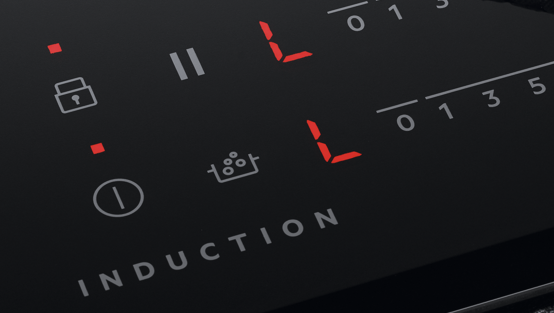
Refer to the article: Hob displays message L
The procedure depends on the model of the appliance. Download the user manual.
6. Deactivate the STOP+GO or Pause function.
Refer to the article:
Induction Hob - How To Use Hob Stop and Go or the "Pause" Feature
Refer to the full description in the user manual, as the procedure depends on the model of the appliance.
7. Deactivate the Demo Mode.
Refer to the full description in the user manual, as the procedure depends on the model of the appliance.
Still need help? Get expert support
If the issue continues, a professional technician can help diagnose and fix the problem.
No matter if your appliance is in warranty, out of warranty, or covered by an appliance protection plan — we’ll guide you to the right service.
Was this article helpful?
Related Articles
- Causes of cracks across induction or ceramic hobs
- How to use the power settings on a hob with slide controls (video)
- TotalFlex Hob will not detect pans and cookware
- Hob blows/ trips fuse
- Hob displays error message E7
- The induction hob is noisy, makes a humming sound
- Induction hob displays error code F or F1
- Induction Hob Connecting Cable Not Supplied With The Appliance
- Hob displays message L, the hob is locked
- Symbols and functions on your AEG induction hob
Spare parts & Accessories
Find original spare parts and accessories for your appliance in our webshop and have them delivered directly to your door.
Related Articles
- Causes of cracks across induction or ceramic hobs
- How to use the power settings on a hob with slide controls (video)
- TotalFlex Hob will not detect pans and cookware
- Hob blows/ trips fuse
- Hob displays error message E7
- The induction hob is noisy, makes a humming sound
- Induction hob displays error code F or F1
- Induction Hob Connecting Cable Not Supplied With The Appliance
- Hob displays message L, the hob is locked
- Symbols and functions on your AEG induction hob