One of the rings on my Gas Cooker/Hob won’t stay alight?
Issue
- The burner flame goes out after you have let go of the control knob
Applies to
- Freestanding Cooker
- Gas Hob
Resolution
- Push the control knob down and turn it counterclockwise to the maximum position, don't try to ignite the burner in a minimum position.
- After you have lit the flame, keep the knob pushed for at least 10 seconds.
- Check the burner cap and crown are positioned correctly and that the burner crown is clean or if you just cleaned them make sure they are completely dry
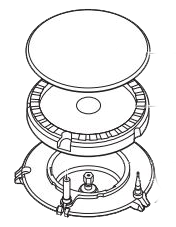
If the above steps don't resolve the issue then a service visit by one of our approved service providers is recommended.
Cause
- The burner cap or crown are not placed correctly or blocked with debris/water
- The thermocouple has failed
Was this article helpful?
Related Articles
- Symbols and functions on your AEG induction hob
- How to use the power settings on a hob with basic controls (video)
- Hob displays message A
- Hob displays message L, the hob is locked
- How to use the child lock and lock function on your AEG induction hob
- Touch Control Induction or Ceramic hob beeps and then switches off
- The drawer under induction hob gets very hot
- Hob blows/ trips fuse
- How to Find the PNC Number on an Installed Hob
- Hob displays error message E6 / E641
Spare parts & Accessories
Find original spare parts and accessories for your appliance in our webshop and have them delivered directly to your door.
Related Articles
- Symbols and functions on your AEG induction hob
- How to use the power settings on a hob with basic controls (video)
- Hob displays message A
- Hob displays message L, the hob is locked
- How to use the child lock and lock function on your AEG induction hob
- Touch Control Induction or Ceramic hob beeps and then switches off
- The drawer under induction hob gets very hot
- Hob blows/ trips fuse
- How to Find the PNC Number on an Installed Hob
- Hob displays error message E6 / E641