Why Does My Vacuum Cleaner Stop? Causes & Easy Fixes
Issue
- Why does my vacuum cleaner stop suddenly?
- Common causes of a vacuum cleaner stopping
- How to fix a vacuum cleaner that keeps turning off
- Vacuum cleaner does not start
- Vacuum cleaner poor suction
Applies to
- Vacuum Cleaner
- Bagless Vacuum Cleaner
Resolution
Why Does My Vacuum Cleaner Stop? Causes & Simple Fixes
If your vacuum cleaner stops suddenly during use, it is usually caused by blocked airflow, overheating, or a full dust container. The good news is that most issues are easy to fix with a few simple checks.
This guide explains the most common reasons why your vacuum cleaner stops working and how to get it running again quickly.
Why Does a Vacuum Cleaner Stop Working?
Modern vacuum cleaners include safety features that automatically switch off the motor if a problem is detected. This helps prevent damage - most commonly when airflow is restricted or the appliance overheats.
Common Causes of a Vacuum Cleaner Stopping
1. Blocked Hose, Nozzle or Brush Roll
Dust, hair, or debris can block airflow and force the motor to work harder.
What to check:
- Inspect the hose for obstructions
- Check the floor nozzle and brush roll
- Remove tangled hair or debris
2. Dirty or Clogged Filters
Filters trap dust and allergens, but when blocked, they reduce airflow and can cause the vacuum to shut down.
Solution:
- Clean washable filters regularly
- Replace filters if heavily soiled
- Replace filters at least twice a year for optimal performance
Blocked filters are one of the most common causes of shutdown due to restricted airflow and overheating. You can buy original replacement filters in our online shop.
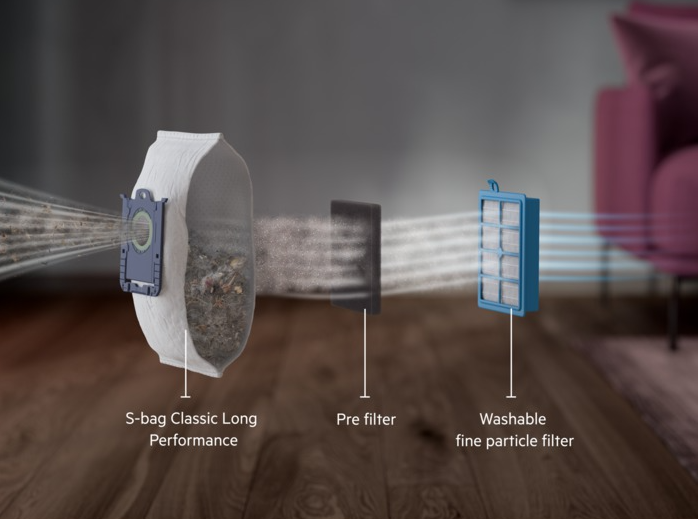
Bagged models filtration system (may vary depending on model)
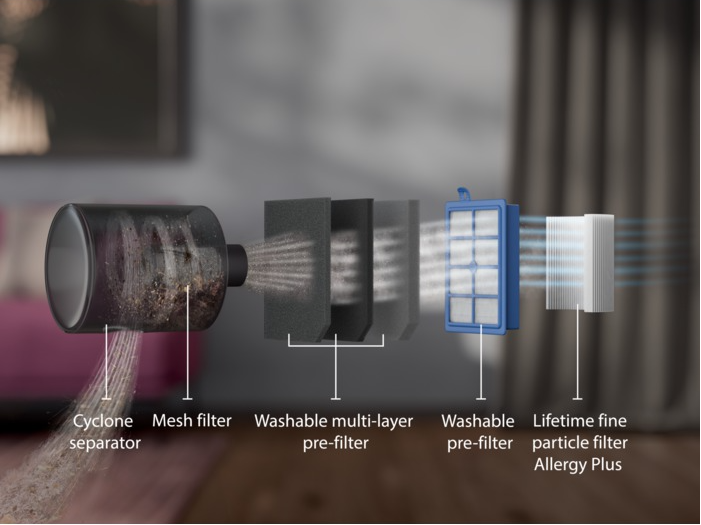
Bagless models' filtration system (may vary depending on model)
3. Full Dust Bag or Container
A full dust bag or container reduces suction and increases strain on the motor.
Solution:
- Empty the dust container (bagless models)
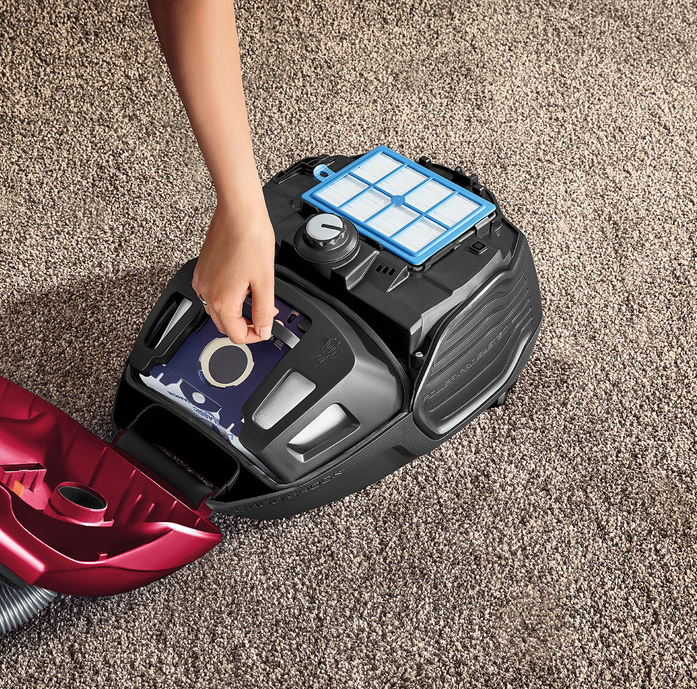
- Replace the bag when full (check indicator lights if available)
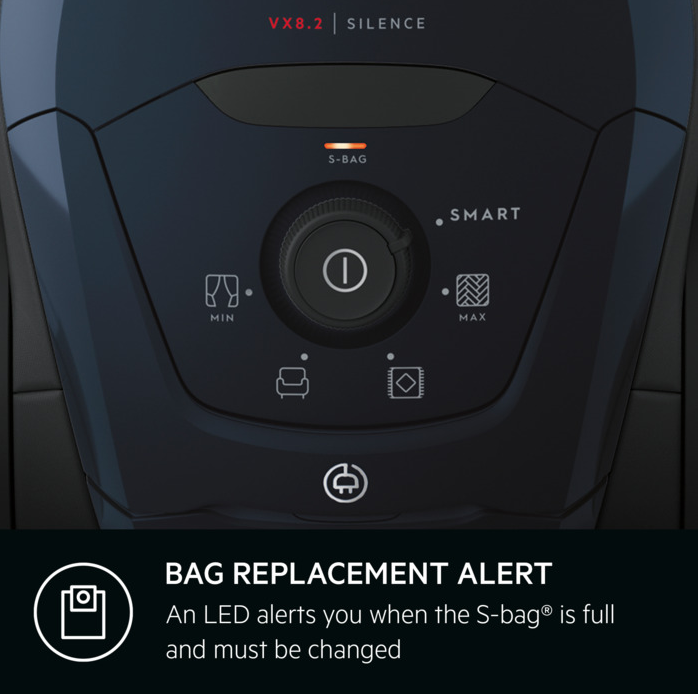
Replace the bag if necessary; a red LED alerts you when the S-bag® is full and must be changed.
S-bag® is available in different materials to fit your needs and to optimise your vacuum cleaner performance: Classic Long Performance, Anti-Allergy, Anti-Odour and Ultra Long Performance.
You can buy original replacement S-bags® in our online shop.
For optimum performance, bags should be changed regularly and filters should be changed with every 4th vacuum bag change. All filters should be replaced at least twice a year or when they become visibly soiled. The use of non-genuine s-bag® vacuum bags may adversely affect the performance of your vacuum cleaner.
4. Overheating Protection
If the motor becomes too hot, the vacuum will automatically switch off to prevent damage.
Solution:
- Turn off and unplug the vacuum
- Let it cool down for at least 30 minutes
- Check for blockages or dirty filters before restarting
Overheating is typically caused by restricted airflow or excessive load on the motor.
5. Battery or Power Issues (Cordless Models)
For cordless models, the vacuum may stop due to low battery or charging issues.
Solution:
- Fully charge the battery
- Ensure the charger is functioning properly
6. Electrical or Internal Faults
If none of the above fixes resolve the issue, there may be a wiring or internal component problem.
Solution:
- Do not attempt to repair internal parts yourself
- Contact an authorised service centre
Quick Troubleshooting Checklist
Before contacting service, go through this quick checklist:
- Empty the dust bag or container
- Clean or replace filters
- Check hose and nozzle for blockages
- Inspect brush roll for tangled debris
- Allow the vacuum to cool down
- Check power supply or battery charge
How to Prevent Your Vacuum Cleaner from Stopping
Regular maintenance helps avoid unexpected shutdowns:
- Clean filters regularly
- Empty the dust container after use
- Check for blockages frequently
- Replace bags and filters as recommended
- Avoid vacuuming large debris that may cause clogs
When to Contact Support
If your vacuum cleaner still does not work after troubleshooting, it may require professional repair.
Contact an authorised service centre for support and genuine spare parts.
FAQs
Why does my vacuum cleaner keep switching off?
This is usually caused by overheating due to blocked airflow, dirty filters, or a full dust container.
How long should I let my vacuum cool down?
Allow at least 30 minutes before restarting.
Can clogged filters cause a vacuum to stop working?
Yes, clogged filters restrict airflow, which can cause overheating and automatic shutdown.
Summary
A vacuum cleaner that stops working is often a sign of:
- Blocked airflow
- Dirty filters
- Full dust container / bag
- Overheating
Most issues can be resolved with simple maintenance, helping keep your vacuum running efficiently for longer.
Keep your vacuum cleaner performing at its best with original spare parts and accessories. Visit our Webshop for the full range and easy online ordering.
Was this article helpful?
Related Articles
- Your guide to vacuum attachments
- Vacuum cleaner smells
- The vacuum cleaner does not start
- The vacuum cleaner bag is not fitted properly or the lid cannot close
- Remote on handle not working on AEG/Electrolux cylinder cleaners
- Vacuum cleaner has poor suction or switches itself off
- The S-bag® indicator light is illuminated
- The S-Bag® indicator light lights up in white
- How to use auto mode on your AEG vacuum cleaner
- Suction power control symbols on vacuum cleaners
Related Articles
- Your guide to vacuum attachments
- Vacuum cleaner smells
- The vacuum cleaner does not start
- The vacuum cleaner bag is not fitted properly or the lid cannot close
- Remote on handle not working on AEG/Electrolux cylinder cleaners
- Vacuum cleaner has poor suction or switches itself off
- The S-bag® indicator light is illuminated
- The S-Bag® indicator light lights up in white
- How to use auto mode on your AEG vacuum cleaner
- Suction power control symbols on vacuum cleaners