Suction power control symbols on vacuum cleaners
Issue
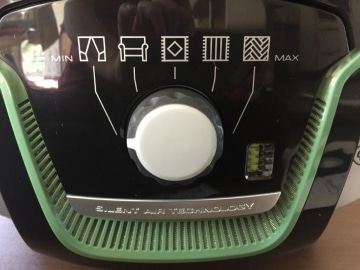
- What do the symbols on the rotary control mean
- What is the best suction settings in my vacuum cleaner?
Resolution
- All AEG vacuum cleaners with adjustment function
Cause
The suction power can be conveniently adjusted on the device, with symbols indicating the recommended settings:
- curtains
- furniture
- Runners, rugs (exposed carpets)
- Firm carpet
- Hard floors (parquet, tiles, etc.)
 |  |  |  |  |
Curtains | Furniture | Runners, rugs (exposed carpets) | Firm carpet | Hard floors (parquet, tiles, etc.) |
Was this article helpful?
Related Articles
- Remote on handle not working on AEG/Electrolux cylinder cleaners
- Vacuum cleaner has poor suction or switches itself off
- The S-bag® indicator light is illuminated
- Why Does My Vacuum Cleaner Stop? Causes & Easy Fixes
- The S-Bag® indicator light lights up in white
- How to use auto mode on your AEG vacuum cleaner
- S-bag® the smart bag that simplifies life
- The vacuum cleaner does not start
- Clearing the vacuum cleaner hose
- Vacuum cleaner smells
Related Articles
- Remote on handle not working on AEG/Electrolux cylinder cleaners
- Vacuum cleaner has poor suction or switches itself off
- The S-bag® indicator light is illuminated
- Why Does My Vacuum Cleaner Stop? Causes & Easy Fixes
- The S-Bag® indicator light lights up in white
- How to use auto mode on your AEG vacuum cleaner
- S-bag® the smart bag that simplifies life
- The vacuum cleaner does not start
- Clearing the vacuum cleaner hose
- Vacuum cleaner smells