Dishwasher is stuck mid-cycle and won't allow me to select a different programme
Issue
- The dishwasher is stuck mid-cycle
- Cannot select another cycle, the dishwasher is stuck on the programme
- How to cancel the Delay Start option?
Applies to
- Dishwashers
Resolution
It would appear a programme has already been started and so another cycle can not be selected.
Press and hold the RESET / CANCEL button(s) (normally highlighted on the fascia), which should abort the cycle and drain the appliance.
Refer to your dishwasher user manual.
Note: The images shown may represent a different or older user‑interface version. Button layout, symbols, or indicators may vary depending on the model. Always refer to your user manual for details specific to your appliance.
For built-in models*
To cancel a previously selected program/delay start, press and hold the ON/OFF button for approximately 3 seconds.
The appliance will return to program selection mode.

For freestanding models*
Canceling the programme
Press and hold simultaneously Delay Start and Options until the appliance is in programme selection mode.
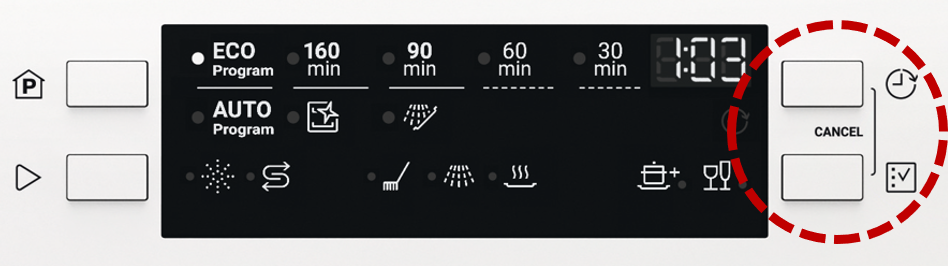
*This is a general guide to solving this issue and may not be particular to your appliance.
To find more information specific to your appliance you may want to look at the user manual of your appliance.
Once this has happened turn the appliance off and back on. You should now have the option to select your desired programme.
Still need help? Get expert support
If the issue continues, a professional technician can help diagnose and fix the problem.
No matter if your appliance is in warranty, out of warranty, or covered by an appliance protection plan — we’ll guide you to the right service.
Was this article helpful?
Related Articles
- How to connect your AEG dishwasher to the app
- Dishwasher displays error code i40, i43 or i44
- Dishwasher displays error code I20, C2, F2 or AL6, or beeps twice, not draining
- Dishwasher door drops down or opens by itself
- ComfortLift Dishwasher Upper Basket Stuck or Jammed - A Quick Video
- How to change the drain filter in my AEG dishwasher? (video)
- Dishwasher displays error code i24, not draining
- Dishwasher displays error code i23, not draining
- How to disable the AirDry function in a dishwasher with a QuickSelect panel (level 2)
- Dishwasher Making Noises – Normal Sounds and Signs of a Problem
Spare parts & Accessories
Find original spare parts and accessories for your appliance in our webshop and have them delivered directly to your door.
Related Articles
- How to connect your AEG dishwasher to the app
- Dishwasher displays error code i40, i43 or i44
- Dishwasher displays error code I20, C2, F2 or AL6, or beeps twice, not draining
- Dishwasher door drops down or opens by itself
- ComfortLift Dishwasher Upper Basket Stuck or Jammed - A Quick Video
- How to change the drain filter in my AEG dishwasher? (video)
- Dishwasher displays error code i24, not draining
- Dishwasher displays error code i23, not draining
- How to disable the AirDry function in a dishwasher with a QuickSelect panel (level 2)
- Dishwasher Making Noises – Normal Sounds and Signs of a Problem