Dishwasher does not / will not start but the power is on
Issue
- The dishwasher does not / will not start but the power is on
- The dishwasher is stuck on the programme, cannot select a new one
Applies to
- integrated dishwasher
- freestanding dishwasher
Resolution
There are a few things that can be checked on the appliance before looking at a repair:
1. Make sure a program has been selected before closing the door
Use the program selector either on the front of the appliance or the top of the door to select the desired programme and any additional extras you may want (such as extra power or glass care).
2. The programme should start only when the door is closed
The appliance will only start the programme when the door is detected to be fully closed. You may need to open and close the door again. You should hear an audible click which indicates the door is closed.
3. A previous setting may still be set on the appliance, such as Delay Start, or the previous programme may still be active
Removing a previous setting depends on the controls that you have on your appliance. You will need to reset the appliance.
Please take a look at the images below* of our dishwashers to see how to reset an appliance.
Press and hold the RESET / CANCEL button(s) (normally highlighted on the fascia) which should abort the cycle and drain the appliance.
*Note: The images shown below are for reference only and may represent a different or earlier user‑interface version. Button layout, programme names, symbols, or indicators may vary depending on the appliance model. Always refer to your user manual for information specific to your appliance.
Integrated dishwashers
On a control panel like this to reset the appliance, press and hold the ON/OFF button on the appliance for 3 seconds. This will reset the appliance and clear any previously set programmes.

On a control panel like this to reset the appliance, press and hold the RESET button on the appliance for 3 seconds. This will reset the appliance and clear any previously set programmes.
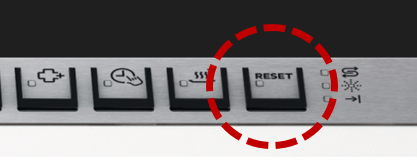
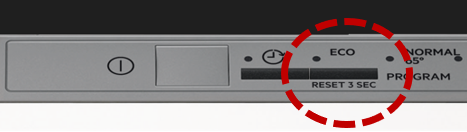
Freestanding dishwashers
On a control panel like this to reset the appliance, press and hold the Option button and the Delay button until the appliance has returned to the programme selection mode.
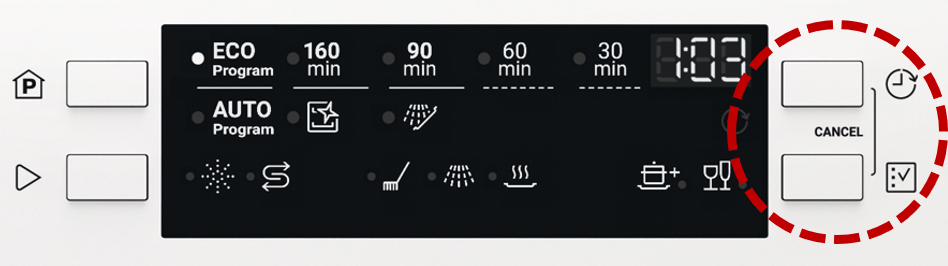
If your appliance has a ‘RESET/CANCEL’ button. Press and hold this for 3-5 seconds and this will clear any previously set programmes or functions.
4. DEMO mode activated.
The DEMO function can display the appliance's functions without being connected to water and drain.
The start animation lasts 3 seconds and turns off, the dishwasher does not start the program
Refer to the article: Dishwasher shows "d:on" in display / DEMO mode deactivation
5. For dishwashers with the "AirDry" function, check whether the installation is correct. Refer to the article:
Still need help? Get expert support
If the issue continues, a professional technician can help diagnose and fix the problem.
No matter if your appliance is in warranty, out of warranty, or covered by an appliance protection plan — we’ll guide you to the right service.
Was this article helpful?
Related Articles
- Is it possible to connect the dishwasher to hot water supply?
- ComfortLift Dishwasher Upper Basket Stuck or Jammed - A Quick Video
- Dishwasher displays error code i40, i43 or i44
- AEG Dishwasher Displays an Error Code – Causes and Solutions
- How to add salt to your AEG dishwasher
- Dishwasher displays error code iF0, iFo or iF1 - causes and solutions
- The auto-cleaning indicator ("Machine Care") lights up on the dishwasher
- How to connect your AEG dishwasher to the app
- Dishwasher displays error code I20, C2, F2 or AL6, or beeps twice, not draining
- Dishwasher door drops down or opens by itself
Spare parts & Accessories
Find original spare parts and accessories for your appliance in our webshop and have them delivered directly to your door.
Related Articles
- Is it possible to connect the dishwasher to hot water supply?
- ComfortLift Dishwasher Upper Basket Stuck or Jammed - A Quick Video
- Dishwasher displays error code i40, i43 or i44
- AEG Dishwasher Displays an Error Code – Causes and Solutions
- How to add salt to your AEG dishwasher
- Dishwasher displays error code iF0, iFo or iF1 - causes and solutions
- The auto-cleaning indicator ("Machine Care") lights up on the dishwasher
- How to connect your AEG dishwasher to the app
- Dishwasher displays error code I20, C2, F2 or AL6, or beeps twice, not draining
- Dishwasher door drops down or opens by itself