How can I adjust the air direction in my PURE air purifier?
Issue
- How can I adjust the air direction in my PURE air purifier?
Applies to
- AEG PURE 7000 series air purifiers
Resolution
The unit is equipped with a hood to give a comfortable air environment. Adjust the air outlet direction by pulling up the hood manually. The hood can be adjusted at the desired angle between 6˚ - 90˚.
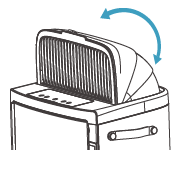
This unit also has the SWING feature, pressing the SWING button can activate the Swing feature to get your desired airflow direction.

There you have below 3 options:
Natural Breeze (move the fins/louvres in the grill in a random way back and forth with a wide angle range).
Wide (move the fins/louvres in the grill in a consistent way in a wide angle range).
Narrow (move the fins/louvres in the grill in a consistent way in a narrow-angle range).

Was this article helpful?
Related Articles
- Air purifier Wi-Fi connection problems
- Why does my AX5/AX7 air purifier show very high TVOC values?
- The App shows my air purifier as unavailable
- I have changed my home Wi-Fi router, do I need to re-connect the appliance?
- AEG app is not available in the AppStore or Google Play
- AEG app doesn't update after filter replacement
- "Could not connect" error during air purifier onboarding
- Why is the ionizer keep turning on even if I set it to off?
- Where can I buy filters for my air purifier?
- Air purifier - how to turn on WiFi / Bluetooth connection?
Related Articles
- Air purifier Wi-Fi connection problems
- Why does my AX5/AX7 air purifier show very high TVOC values?
- The App shows my air purifier as unavailable
- I have changed my home Wi-Fi router, do I need to re-connect the appliance?
- AEG app is not available in the AppStore or Google Play
- AEG app doesn't update after filter replacement
- "Could not connect" error during air purifier onboarding
- Why is the ionizer keep turning on even if I set it to off?
- Where can I buy filters for my air purifier?
- Air purifier - how to turn on WiFi / Bluetooth connection?