How to set an oven timer - AEG
Issue
- How to set an oven timer
Applies to
- AEG built-in ovens
Resolution
Command Wheel


2. Press dial to confirm selection
3. Turn the wheel to the required time
4. Press dial to confirm selection
5. Timer will then be display in the bottom left hand corner
Skip to 0:13 on the video for the command wheel
Rotary display


2. Use the temperature dial to select the time
3. Leave for a few seconds and timer will automatically be set
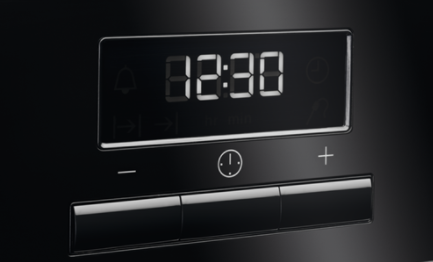


4. Leave for a few seconds and timer will be set
Some ovens may come with the additional clock feature so just press the button with the bell on
Skip to 0:32 for the rotary control with buttons
Touch Control



3. Leave for a few seconds and the timer will set itself
4. Press on the bottom left hand corner to see the timer
Skip to 1:05 for the Touch control
Please see the instructional video.
You can download your user manual
If you found the following information helpful, please give us a thumbs up below. If this information did not resolve your question, all constructive feedback is welcome.
Was this article helpful?
Related Articles
- Gas grilling - Open door
- How to Proof Dough in an Oven (Without a Proofing Setting)
- How to clean stainless steel or aluminium oven front panel / door?
- Using the Oven Grill Function
- Oven does not heat up
- Symbols and functions on your AEG oven or cooker
- How to set the clock on an AEG oven
- How To Use Dough Proving Oven Function
- Oven display shows PYR
- How to use the Aqua Clean function on your Oven
Related Articles
- Gas grilling - Open door
- How to Proof Dough in an Oven (Without a Proofing Setting)
- How to clean stainless steel or aluminium oven front panel / door?
- Using the Oven Grill Function
- Oven does not heat up
- Symbols and functions on your AEG oven or cooker
- How to set the clock on an AEG oven
- How To Use Dough Proving Oven Function
- Oven display shows PYR
- How to use the Aqua Clean function on your Oven