How to disable the AirDry function in a dishwasher with a QuickSelect panel (level 2)
Issue
- I cannot turn off AirDry function
- How to disable AirDry function in dishwasher?
- How to disable the automatic door opening in the dishwasher?
Resolution
To disable the AirDry function in a dishwasher with a QuickSelect panel (level 2), follow the steps below*:

1. First, enter the SETTINGS mode by pressing the Quick and ECO buttons for about 3 seconds.
You can enter setting mode before starting a programme. You cannot enter setting mode while the programme is running.
2. Three LEDs will light up on the MY TIME bar
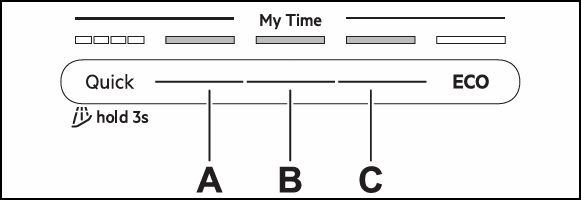
A - Previous button
B - OK (confirm) button
C - Next button
The display shows the first setting: HAr (Water Hardness).
Use Previous and Next to switch between the settings and to change their value. Use Confirm to enter the setting and to confirm changing its value.
How to change Auto door open (Ado) setting
Make sure the appliance is in setting mode.
1. Press Previous or Next to select a setting. The display shows the setting name.
2. Press OK (Confirm) to enter the setting. The current setting value flashes.
3. Press Previous or Next to change the value.
Select On to activate or Off to deactivate Air Dry function. Default: On.
4. Press OK (Confirm) to confirm the setting. The setting is saved.
The appliance returns to the settings list.
5. To exit setting mode, press and hold simultaneously ECO and AUTO for about 3 seconds. The appliance returns to the programme selection.
The saved settings remain valid until you change them again.
*Note: The images shown are for reference only and may represent a different or earlier user‑interface version. Button layout, programme names, symbols, or indicators may vary depending on the appliance model. Always refer to your user manual for information specific to your appliance.
Was this article helpful?
Related Articles
- Is it possible to connect the dishwasher to hot water supply?
- The auto-cleaning indicator ("Machine Care") lights up on the dishwasher
- Dishwasher displays error code i40, i43 or i44
- Program not starting and cycle indicator light flashing on dishwasher
- Can I use dishwasher salt in my 9000 series washing machine's SoftWater filter?
- Symbols & programmes on your AEG dishwasher
- Dishwasher is not heating up water
- How to remove and clean dishwasher base filters
- How to deactivate/turn off AirDry/door opens automatically on AEG dishwasher
- How to clean and maintain your AEG dishwasher
Related Articles
- Is it possible to connect the dishwasher to hot water supply?
- The auto-cleaning indicator ("Machine Care") lights up on the dishwasher
- Dishwasher displays error code i40, i43 or i44
- Program not starting and cycle indicator light flashing on dishwasher
- Can I use dishwasher salt in my 9000 series washing machine's SoftWater filter?
- Symbols & programmes on your AEG dishwasher
- Dishwasher is not heating up water
- How to remove and clean dishwasher base filters
- How to deactivate/turn off AirDry/door opens automatically on AEG dishwasher
- How to clean and maintain your AEG dishwasher