How to set the AutoDose functionality in my AEG washing machine
Issue
- How to set the AutoDose functionality in my AEG washing machine
Applies to
- AEG washing machines with AutoDose functionality
Resolution
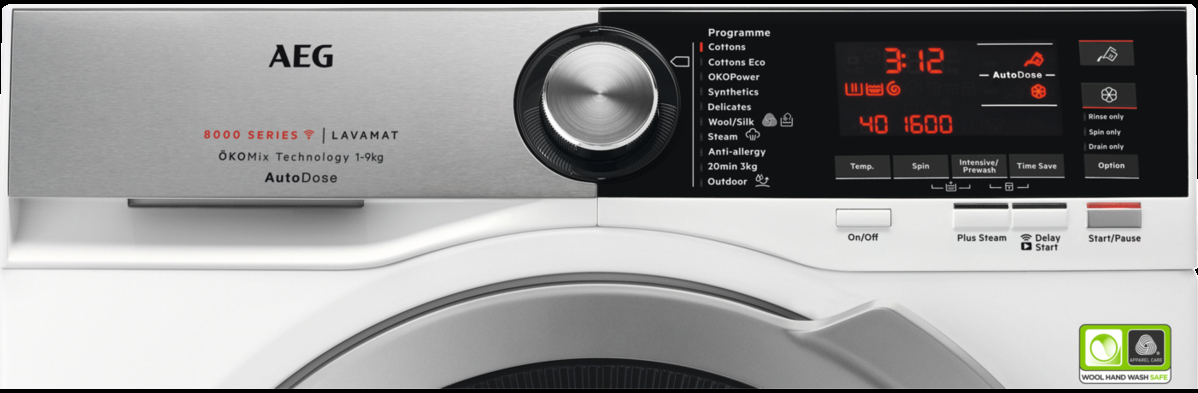
Depending on the control panel layout of your AEG washing machine, use the following instructions for Autodose setup:
Control panel version 1


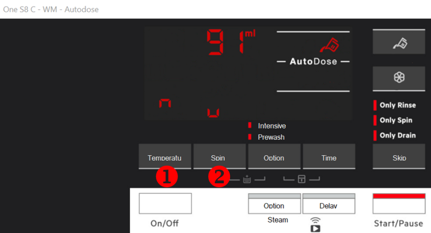
7. If no other action will be done, after 10 seconds, the display returns to the program and the AutoDose detergent tank is enabled.

8. Touch Softener tank button (1). The display shows OFF (2).
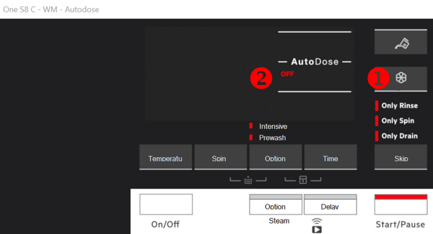

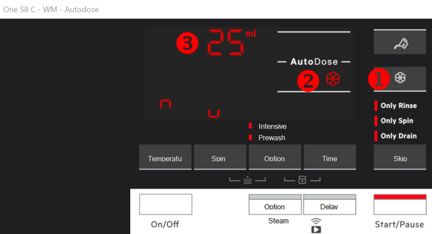
10. Touch again the softener tank button (1). The display shows tank indicator (2) and the default detergent level (3).

SUMMARY TABLE | ||
SETTING MODE (1) | STANDARD MODE (2) | |
DETERGENT TANK | OFF | DEACTIVATE |
ON | ACTIVATE/DEACTIVATE | |
SOFTENER TANK | OFF | DEACTIVATE |
ON | ACTIVATE/DEACTIVATE | |
(1): STATUS OF THE TANK SET DURING THE SETTING MODE
(2): ACTIONS PERMITTED IN THE STANDARD MODE
Control panel version 2
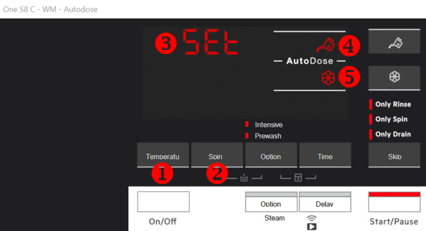
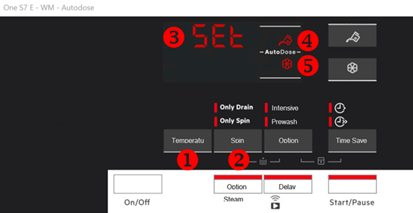
1. To enter in configuration mode, hold pressed the Temperature (1) and the Spin (2) buttons simultaneously for a few seconds until the display shows “SET” (3) on the left in the display and blinking detergent tank (4) and softener tank (5) indicators on the right in the display.
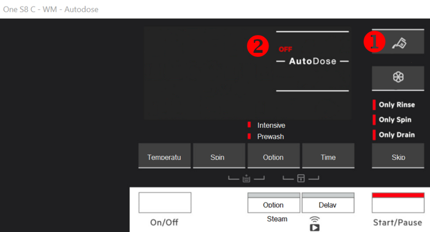
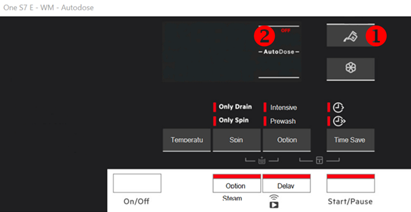
2. Touch detergent tank button (1). The display shows OFF (2).
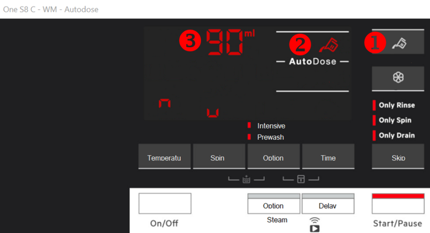
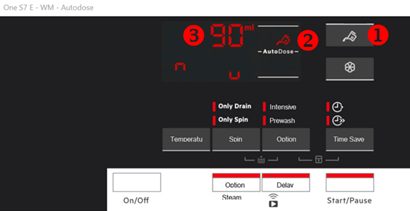
5. Touch again the detergent tank button (1). The display shows tank indicator (2) and the default detergent level (3).
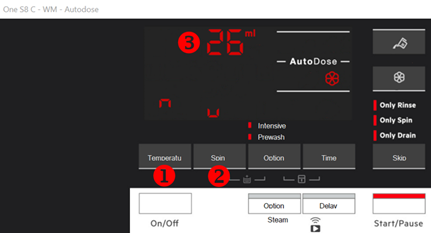
6. To set basic dosage touch the Temperature button (1) repeatedly to adjust the dosage upwards and the Spin button (2) to adjusts it downwards. The minimum step is 1 ml
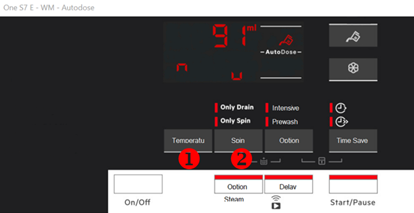
7. If no other action will be done, after 10 seconds, the display returns to the program and the AutoDose detergent tank is enabled.
8. Touch Softener tank button (1). The display shows OFF (2).
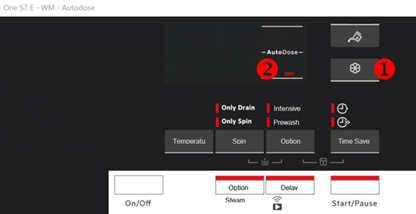
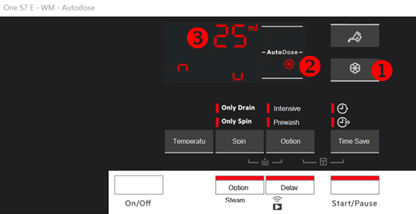
10. Touch again the softener tank button (1). The display shows tank indicator (2) and the default detergent level (3).
11. To set basic dosage touch the Temperature button (1) repeatedly to adjust the dosage upwards and the Spin button (2) to adjusts it downwards. The minimum step is 1 ml.
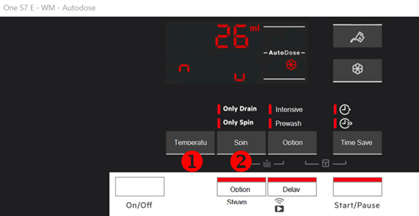
SUMMARY TABLE | ||
SETTING MODE (1) | STANDARD MODE (2) | |
DETERGENT TANK | OFF | DEACTIVATE |
ON | ACTIVATE/DEACTIVATE | |
SOFTENER TANK | OFF | DEACTIVATE |
ON | ACTIVATE/DEACTIVATE | |
(1): STATUS OF THE TANK SET DURING THE SETTING MODE
(2): ACTIONS PERMITTED IN THE STANDARD MODE
Was this article helpful?
Related Articles
- The door of the washing machine cannot be opened
- Washing machine emits humming / pumping noise
- AEG washing machine – how to reset the WiFi settings
- AEG Washing Machine displays an error code - causes and solutions
- AEG Washing machine displays padlock
- Washing Machine Not Working or Not Turning On – Troubleshooting Guide
- How to connect your AEG washing machine, tumble dryer or washer dryer to the app
- The washing cycle is shorter / longer than indicated on the display
- Washing machine blows fuses / trips RCD circuit breaker
- How to change the temperature in the ECO 40-60° program?
Related Articles
- The door of the washing machine cannot be opened
- Washing machine emits humming / pumping noise
- AEG washing machine – how to reset the WiFi settings
- AEG Washing Machine displays an error code - causes and solutions
- AEG Washing machine displays padlock
- Washing Machine Not Working or Not Turning On – Troubleshooting Guide
- How to connect your AEG washing machine, tumble dryer or washer dryer to the app
- The washing cycle is shorter / longer than indicated on the display
- Washing machine blows fuses / trips RCD circuit breaker
- How to change the temperature in the ECO 40-60° program?